
Costs
Planned and actual cost: how time tracking becomes actual project cost

"How much has this project cost so far?" is a simple question that usually takes days to answer. Planned cost is in one spreadsheet, team hours in another and expenses in the finance system. By the time the answer arrives, the month has already closed.
Why actual cost is usually an estimate
On most projects, the biggest cost is people's time. If nobody logs the hours worked, actual labor cost becomes an estimate based on progress, and the variance only shows up when the budget has already been blown.
From time entry to actual cost
- People log their hours: everyone sees their own tasks and logs the week's work.
- The manager approves: pending time entries are in one place, with bulk approval and date and daily-limit rules.
- The system calculates: approved hours are multiplied by each resource's rate tables, with effective dates and overtime.
- The project updates: the actual cost of the project and the portfolio changes on its own, without a side spreadsheet.
Planned, budget and actual side by side
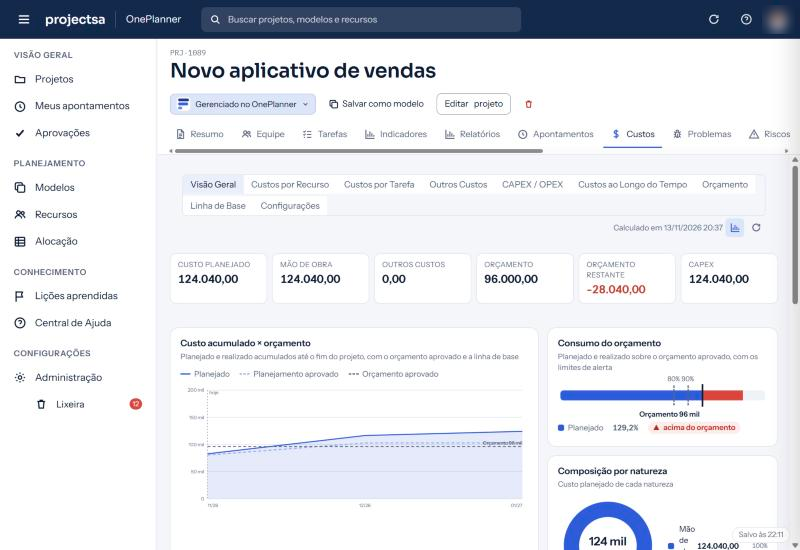
Planned labor cost comes from schedule assignments and rate tables, month by month. Materials, services, expenses and reserves are entered as project entries. The cost screen shows planned cost, approved budget, budget consumption and what is left, and the portfolio adds all of that up across every project.
The way finance asks
Each expense can be classified by cost type, CAPEX or OPEX and cost center, with a base currency. That way, the PMO's report and finance's start from the same numbers.
See how it works in OnePlanner: cost management.
Book a demo and see planned and actual for your portfolio on one screen.
Frequently asked questions
Do I need to log hours to use costs?
No. Without time tracking, OnePlanner shows planned cost and cost entries. With time tracking, actual labor cost becomes accurate.
Can tracking be by percentage?
Yes. Tracking can be by percentage, by hours or both, according to the project's rule.
Can CAPEX and OPEX be separated?
Yes, by cost type and cost center.