
Resources
Resource allocation across multiple projects: how to spot overload before it happens

Each project manager looks at their own schedule and sees a reasonable allocation. The problem only shows up when someone adds it up: the same specialist is on five projects at once, with twice the hours she has in the week. By the time that is clear, the delay has already started.
Why overload stays hidden
- Project-by-project view: each schedule shows only that project's share.
- Different tools: part of the team is on Project projects, part in Planner, part in Jira.
- Absences left out: vacations, holidays and different working hours do not make it into the allocation spreadsheet.
What to look at to spot overload
- Planned hours by person and by week, across all projects.
- Real capacity, considering each person's calendar, absences and daily capacity.
- The difference between the two, highlighted for those over the limit.
- Demand by role, to plan before knowing who will do the work.
How OnePlanner shows it
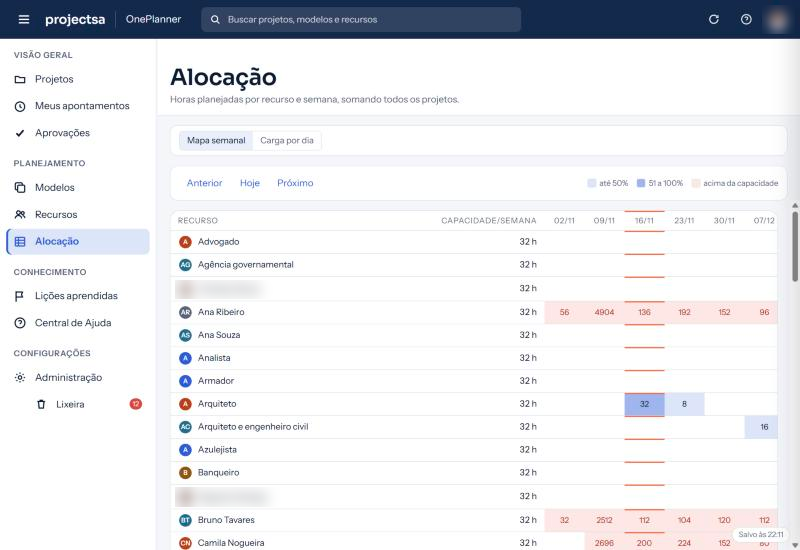
Weekly allocation shows each resource on a heat map: who is available, who is at capacity and who is over capacity, across every project in the portfolio. Resources can be people linked to users or generic resources by role, useful for planning a project before the team is defined. The capacity plan compares demand and capacity across teams, roles and people.
From resource to cost
Each resource has a rate table with effective dates, overtime and cost per use. That way, the same allocation that shows overload also feeds the project's planned cost, month by month.
See how it works in OnePlanner: resource management.
Book a demo and see your team's allocation across all projects.
Frequently asked questions
Does it work with projects from other tools?
Yes, for projects with resource assignments recorded in OnePlanner, including those imported from Microsoft Project.
Does it take vacations and holidays into account?
Yes. Capacity takes calendars and absences into account.
Can I plan by role?
Yes, with generic resources, which are later replaced by people.